Staring at a blank screen every morning, wondering what to post today? You’re not alone.
Without a content calendar, most beginners waste hours deciding what to create, post inconsistently, and miss important opportunities to engage their audience. The result? Burnout, poor engagement, and a content strategy that feels more chaotic than strategic.
In this guide, you’ll learn exactly how to make a content calendar for beginners—even if you’ve never planned content before. We’ll cover what to include, how often to post, which tools to use, and how to stay consistent without overwhelming yourself.
Quick answer: A content calendar is a schedule that maps out what you’ll publish, when, and where. To create one: choose your platforms, decide posting frequency (3-5 posts per week works for most beginners), select a tool (Google Sheets is perfect to start), plan content around key dates, and batch-create your posts in advance.
What is a Content Calendar (And Why Do Beginners Need One)?
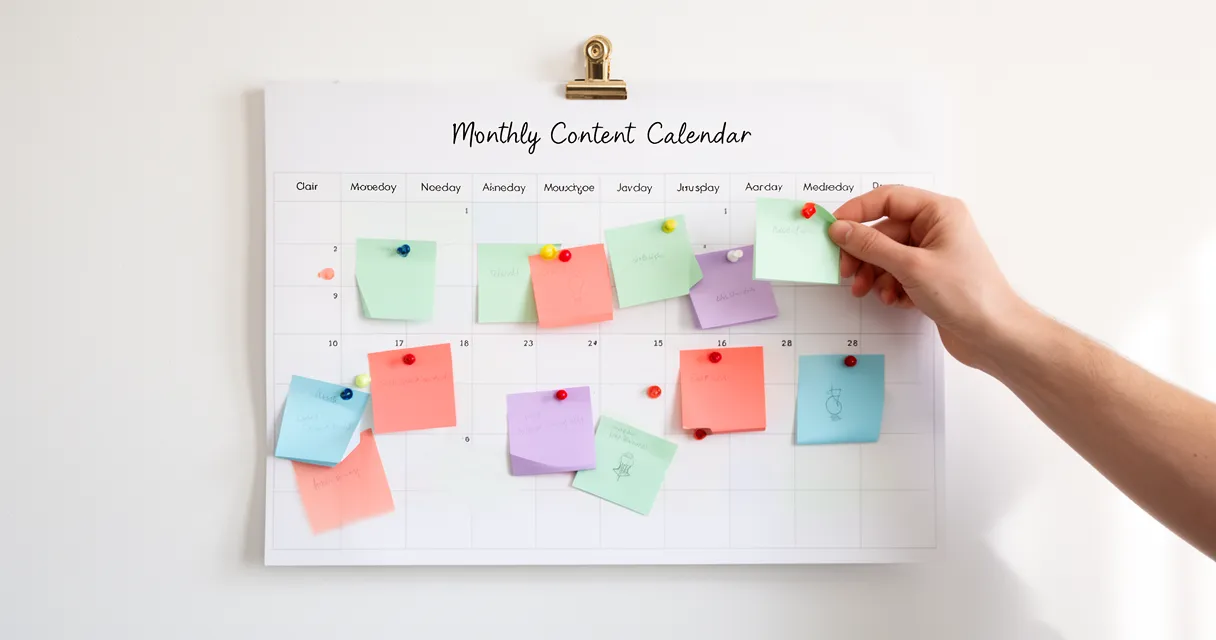
A content calendar is a visual schedule of your content publishing plan. It shows exactly what you’ll post, when you’ll publish it, and on which platforms—all in one organized view.
Here’s why beginners need one: calendars save time, ensure consistency, and reduce decision fatigue. According to Ahrefs Content Marketing Statistics 2026, businesses with a documented content marketing strategy experience 33% higher ROI compared to those without one.
Even more impressive? Content marketing generates over three times as many leads as outbound marketing and costs 62% less, according to DemandSage Content Marketing Statistics 2026.
Before diving into tactical calendar creation, understanding the broader framework of comprehensive content strategy planning helps ensure your calendar serves meaningful business goals.
The Problem with Posting Without a Plan
When you post reactively, several problems emerge fast.
You post inconsistently—maybe three times one week, then radio silence for two weeks. You miss trending topics because you’re always scrambling for ideas. You accidentally duplicate content because you forgot what you posted last month.
Worse, you waste mental energy every single day deciding what to create instead of actually creating it.
What a Content Calendar Actually Looks Like
Think of it as a simple spreadsheet or board with rows and columns.
Each row represents a piece of content. Columns track key information: the date, platform, content type, topic, caption, visual asset location, and status.
It’s not complicated. The whole point is visual simplicity—you should be able to glance at your calendar and know exactly what’s happening this week.
Step 1: Choose Your Content Platforms (Don’t Try to Be Everywhere)
Here’s the first mistake beginners make: trying to post everywhere at once.
Start with 1-2 platforms where your audience actually hangs out. Spreading yourself thin across five platforms guarantees mediocre results everywhere instead of strong results somewhere.
Platform selection should be based on your industry and audience demographics. If you’re targeting professionals, LinkedIn makes sense. If you’re in visual industries like design, fashion, or food, Instagram is your friend.
Platform-Specific Posting Frequency (2026 Data)
Different platforms have different content appetites. Here’s what works in 2026:
- Facebook: 1-2 posts daily (mix of video and text)
- Instagram: 3-5 Reels weekly (daily Stories are bonus)
- X/Twitter: 3-7 posts daily (it’s a high-volume platform)
- LinkedIn: 2-3 posts weekly (quality over quantity here)
- TikTok: 3-7 videos weekly (consistency matters more than frequency)
- YouTube: 1-4 videos weekly (depending on production complexity)
Each platform has different content requirements and ideal frequency. Don’t force the same strategy everywhere.
If you’re planning video content for platforms like YouTube or TikTok, having a systematic approach to formatting your video scripts ensures your batch creation sessions run smoothly.
Step 2: Decide How Often You’ll Post (The Beginner’s Framework)
The sweet spot for beginners is 3-5 posts per week.
According to the Buffer Social Media Frequency Guide 2026, regular posting means 5x more engagement based on analysis of more than 100,000 Buffer users. But here’s the catch: consistency beats volume.
It’s better to post three times weekly for six months than to post daily for three weeks before burning out.
Quality over quantity isn’t just a saying—it’s strategy.
The 3-5-7 Rule for Beginners
Here’s a simple framework for choosing your posting frequency:
- 3 posts minimum: This is the threshold for visibility. Less than three posts weekly and your audience starts forgetting you exist.
- 5 posts optimal: Research shows 3-5 posts per week delivers higher engagement rates compared to posting more or less often (Automateed Optimal Posting Frequency 2026).
- 7 posts maximum: Beyond seven posts weekly, quality typically drops unless you have a dedicated content team.
Start at three posts weekly. Once that feels sustainable for 4-6 weeks, consider increasing to five.
Step 3: Choose Your Content Calendar Tool
Don’t overthink this—start simple.
For beginners, Google Sheets or Excel is perfect. It’s free, flexible, and you already know how to use it.
Fancy tools can wait until you’ve proven consistency with a basic system first.
Free Tools for Beginners
Here are your best free options:
Google Sheets or Excel: Best for starting. Create columns, track content, share with team members. Zero learning curve. This is what we recommend for your first 90 days.
Trello: Visual organization with cards and boards. Great if you’re a visual thinker who likes dragging cards between “planned,” “in progress,” and “published” columns.
Notion: All-in-one workspace that combines calendar, database, and notes. Slight learning curve but extremely powerful once you understand it.
AI-Powered Calendar Assistants: Tools like ChatGPT or Claude can help generate content ideas, suggest posting schedules based on your industry, and even draft captions. Ask “Give me 20 content ideas for a [your industry] brand” and you’ll have your month planned in minutes.
When to Consider Paid Tools
Upgrade to paid tools when you’re consistently posting across multiple platforms and want automation.
CoSchedule (starting $29/month): Comprehensive marketing calendar with social scheduling, team workflows, and analytics dashboards.
Buffer (free for 3 channels, $6/month for more): Social media scheduler that lets you queue posts across platforms and analyze performance.
Hootsuite (starting $99/month): Enterprise-level tool for teams managing multiple brands and clients.
AI-Enhanced Scheduling Tools: Platforms like Later and Metricool now include AI features that suggest optimal posting times, generate hashtags, and even predict engagement rates based on historical data.
Don’t upgrade until scheduling manually feels genuinely overwhelming—usually when you’re posting 5+ times weekly across 3+ platforms.
Step 4: Set Up Your Content Calendar for Beginners (What to Include)
When you organize a content calendar, start with essential columns only.
You can always add complexity later, but beginning with too many fields paralyzes you.
The Beginner’s Content Calendar Template
Here’s exactly what to include in your content calendar template for beginners:
Essential columns:
- Publishing Date: When it goes live (including time if scheduling matters)
- Platform: Where you’re posting (Instagram, LinkedIn, etc.)
- Content Type: Format (Reel, carousel, blog post, video)
- Topic/Title: What it’s about in 3-5 words
- Caption/Copy: The actual text (or “see doc” with link to longer copy)
- Visual Asset: File name or link to image/video location
- Status: Idea → Draft → Ready → Scheduled → Published
- Notes: Any important details or reminders
Optional but helpful columns:
- Target Keywords: For SEO-focused content
- CTA: Call-to-action (link, comment prompt, share request)
- Campaign: If grouping related content
- Performance: Engagement metrics after publishing
Keep it simple initially. The best calendar is the one you’ll actually maintain.
Step 5: Plan Your Content Around Key Dates
Content planning for small business starts with your annual calendar.
Open Google Calendar and mark every relevant date: holidays, industry events, product launches, seasonal trends, awareness months.
These anchor dates give your content structure and relevance.
Creating Your Content Theme Framework
Theme frameworks prevent random posting while maintaining flexibility.
Here’s a simple structure many beginners love:
- Educational Mondays: How-to tips, tutorials, industry insights
- Behind-the-Scenes Wednesdays: Process, team, workspace, day-in-the-life
- FAQ Fridays: Answer common customer questions
- Weekend Engagement: Polls, questions, community spotlights
This framework means you never wonder “what type of content should I create today?”
But leave 20-30% of your calendar flexible for real-time content, trending topics, and spontaneous opportunities. Rigid calendars break when reality happens.
Step 6: Generate and Organize Your Content Ideas
Sit down once and brainstorm 20-30 content ideas in a single session.
This batch ideation approach is faster than thinking up ideas one at a time. Set a timer for 30 minutes and don’t stop writing until it goes off.
Sources for ideas:
- Customer questions (your FAQ is content gold)
- Industry news and trends
- Your product features (one feature = multiple content angles)
- Competitor content (add your unique spin)
- Behind-the-scenes processes
- Team member spotlights
- User-generated content
- Seasonal events and holidays
AI Idea Generation: Use ChatGPT or Claude as your brainstorming partner. Prompt: “I run a [industry] business targeting [audience]. Generate 30 content ideas covering educational, promotional, and engagement content.” Review the list, pick what resonates, and customize.
The 3-Bucket Content System
Balanced content keeps your audience engaged without overwhelming them with sales pitches.
Follow this distribution:
Educational content (50%): How-tos, tips, industry insights, tutorials. This builds trust and positions you as an expert.
Promotional content (30%): Product features, testimonials, case studies, special offers. This drives conversions.
Engagement/community content (20%): Questions, polls, user spotlights, behind-the-scenes. This builds relationships.
Map your 20-30 ideas into these three buckets, then distribute them across your calendar dates.
Step 7: Batch Create Your Content
Batching is how professionals create weeks of content in a few hours.
Instead of creating content daily, block off 2-4 hours and create multiple pieces in one focused session. Your brain stays in “creation mode” instead of switching contexts constantly.
Start by scheduling 1-2 weeks ahead. Once that feels comfortable, build to 30 days of scheduled content.
Use templates and frameworks to speed up creation:
- Canva templates for consistent visual branding
- Caption formulas (Hook → Value → CTA)
- AI writing assistants like Jasper or Copy.ai for first drafts
- ChatGPT prompts for variations on similar themes
YouTube content requires more than just the video itself—optimized descriptions are essential metadata to include in your content calendar when writing engaging YouTube descriptions.
Example batching workflow:
- Monday morning: Write all captions for the week
- Monday afternoon: Create or gather all visuals
- Tuesday: Schedule everything in your tool
- Rest of week: Engage with audience, monitor performance
This approach frees up 80% of your week while maintaining consistent posting.
Common Mistakes Beginners Make (And How to Avoid Them)
Mistake 1: Planning too far ahead without flexibility
Planning six months in advance sounds organized but locks you into content that might become irrelevant. Stick to 30-day planning with quarterly themes.
Mistake 2: Choosing too many platforms at once
You can’t master Instagram, LinkedIn, TikTok, YouTube, and Twitter simultaneously as a beginner. Pick one or two and do them well.
Mistake 3: Making the calendar too complex
Fifteen color-coded columns with intricate tagging systems looks impressive but becomes a maintenance nightmare. Simple calendars get used; complex ones get abandoned.
Mistake 4: Never reviewing and adjusting
Your first calendar is a hypothesis. Review what performs well, what flops, and what your audience responds to. Adjust monthly based on data, not guesses.
Mistake 5: Perfectionism paralysis
Waiting until you have the “perfect” system means you never start. Your first calendar will be messy—that’s expected and fine.
How to Maintain Your Content Calendar Without Burning Out
Consistency requires systems, not willpower.
Weekly review (30 minutes): Every Friday, review the past week. What performed well? What fell flat? Any surprises? Adjust next week’s content based on learnings.
Monthly planning session (2 hours): Map out next month’s key dates, brainstorm ideas for the 3-bucket system, and schedule batch creation sessions.
Quarterly audit (3-4 hours): Every 90 days, analyze overall performance. Which content types drive the most engagement? Which platforms deliver ROI? Adjust your strategy accordingly.
Build buffer content: Create 5-10 pieces of evergreen content as backup. When life gets crazy, you have content ready to publish without scrambling.
What to Do When You Fall Behind
You will fall behind at some point—everyone does.
Here’s how to reset without guilt:
Don’t try to “catch up”: Posting seven times in one day to make up for a missed week looks desperate and tanks engagement.
Reduce frequency temporarily: Drop from five posts weekly to three for two weeks while you rebuild your buffer.
Lean on evergreen content: Repurpose or reshare older high-performing content. Your audience hasn’t memorized everything you’ve posted.
Ask for help: User-generated content, team member contributions, or customer testimonials can fill gaps without requiring your creation time.
Use AI to speed recovery: When you’re behind, tools like ChatGPT can help you quickly generate caption variations, content ideas, or even first drafts that you can polish in 10 minutes instead of creating from scratch in an hour.
The goal is sustainable consistency, not perfection.
Frequently Asked Questions
What is a content calendar and why do I need one?
A content calendar is a scheduling tool that organizes what content you’ll publish, when, and where. You need one because it ensures consistency, saves time, reduces stress, and enables strategic planning. According to Ahrefs, businesses with documented content strategies see 33% higher ROI than those without.
What should I include in my content calendar?
Essential fields include publishing date, platform, content type, topic, and status. Optional additions are target keywords, CTAs, links, and image locations. Start simple with just the essentials—you can always add more fields later as your system matures.
How often should I post on social media as a beginner?
Start with 3-5 posts per week. Platform-specific guidance: Facebook (1-2x daily), Instagram (3-5 Reels weekly), LinkedIn (2-3x weekly), X/Twitter (3-7x daily). Remember: quality beats quantity, and consistency beats sporadic bursts.
What tools should I use to create a content calendar?
Beginners should start with Google Sheets or Excel—they’re free, familiar, and flexible. When you want visual organization, try Trello or Notion. Upgrade to CoSchedule, Buffer, or Hootsuite only when you need automation across multiple platforms and have proven consistency with basic tools.
How do I get started with content planning as a complete beginner?
Pick 1-2 platforms, commit to 3-5 posts weekly, use Google Sheets, plan 2 weeks ahead, and batch create your content. Start small and build consistency before adding complexity. Your first calendar doesn’t need to be perfect—it just needs to exist.
How far ahead should I plan my content calendar?
Beginners should start planning 1-2 weeks ahead, then work up to 30 days as you get comfortable. Keep 20-30% of your calendar flexible for trending topics and real-time content. Avoid planning more than 60 days ahead unless you’re scheduling seasonal campaigns.
Conclusion
Content calendars transform chaotic posting into strategic, consistent content that actually delivers results.
Start simple: choose 1-2 platforms, commit to 3-5 posts weekly, and use Google Sheets for your first calendar. Plan your content around key dates but leave 20-30% flexibility for trends and real-time opportunities. Batch create your content and review performance regularly.
Here’s the truth: your first content calendar doesn’t need to be perfect—it needs to exist.
Ready to learn how to make a content calendar for beginners? Start with a simple Google Sheet today, map out your next two weeks of content, and commit to batch-creating your first week’s posts. The consistency will transform your content strategy—and your results.
Need help getting started? Use AI tools like ChatGPT or Claude to brainstorm your first 20 content ideas, then plug them into a basic spreadsheet. Block off two hours this week for your first batch content creation session. Your future self will thank you for the consistency and peace of mind a social media content calendar guide provides.